Udemy

الخميس، 2 أبريل 2020

A step-by-step guide on how to use Facebook Business Manager

Still managing your Facebook Pages and ad accounts through your personal account? While that’s perfectly fine if you’re single-handedly managing your own small business, the same isn’t true if you’re working with a team. Sharing logins is opening the door to security and privacy concerns, and manually adding and assigning roles to teammates on a Facebook Page can be tedious.

This makes it crucial for agencies and businesses alike to use the Facebook Business Manager so they can securely manage their Facebook Pages and ad accounts in one place.

If you haven’t started using the Facebook Business Manager because it seems confusing or intimidating, you’re in luck. This post gives you a detailed guide on how to use the Facebook Business Manager and how it can benefit your business. Let’s dive in.

What is Facebook Business Manager?

As the name suggests, the Facebook Business Manager is a tool that allows you to manage multiple Facebook Pages, business assets and ad accounts, as well as Instagram accounts and product catalogs, in one place. It also allows you to grant full or partial access to team members based on their role. This means you can seamlessly delegate tasks between multiple employees securely.

For agencies, this means you can link multiple client Facebook Pages to your Facebook Business Manager account without linking your or your employees’ personal Facebook accounts as administrators. For businesses, it also means allowing employees to manage your Facebook Page without essentially having over ownership of your Page or assets.
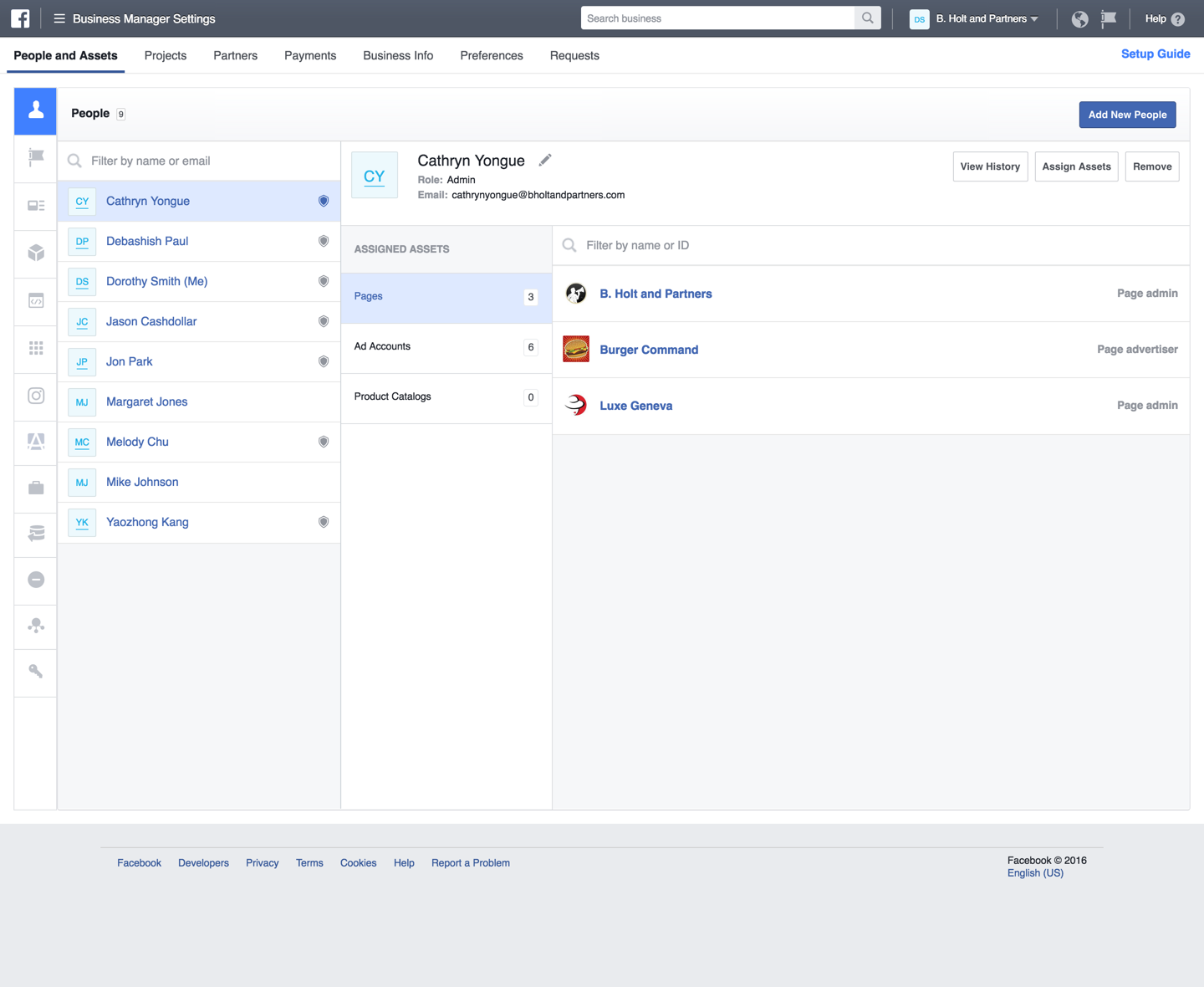
adding users to Facebook Business Manager

6 benefits of Facebook Business Manager

Now that you know what Facebook Business Manager is, you have some idea of why you should use it. But let’s highlight the tool’s top benefits:

  1. Separate your personal profile from your business page. This means you no longer have to worry about privacy concerns or accidentally posting something that’s meant for your Facebook Personal Profile to you Facebook Page (or vice versa).
  2. Effectively manage multiple Facebook Ad Accounts and Pages in one place. This means you have a central location to keep track of your ads and post performance, which makes it easier to organize your efforts.
  3. Securely share access with multiple people. You can give access to agencies, partners or vendors without giving them ownership of your business assets. We’ll show you how to do this later in the article.
  4. Control how much access each employee has based on their role. This simplifies the process of delegating tasks and overseeing what your employees are doing without risking security.
  5. Easily revoke access for people who no longer work for you. Again, because Personal Profiles are not tied to your or your clients’ Facebook Page, it’s easy to maintain an up-to-date roster in Business Manager.
  6. Build different custom audiences for different ad campaigns. This is particularly useful for agencies that have to run ads for multiple clients, as well as for businesses that are targeting different types of audiences.
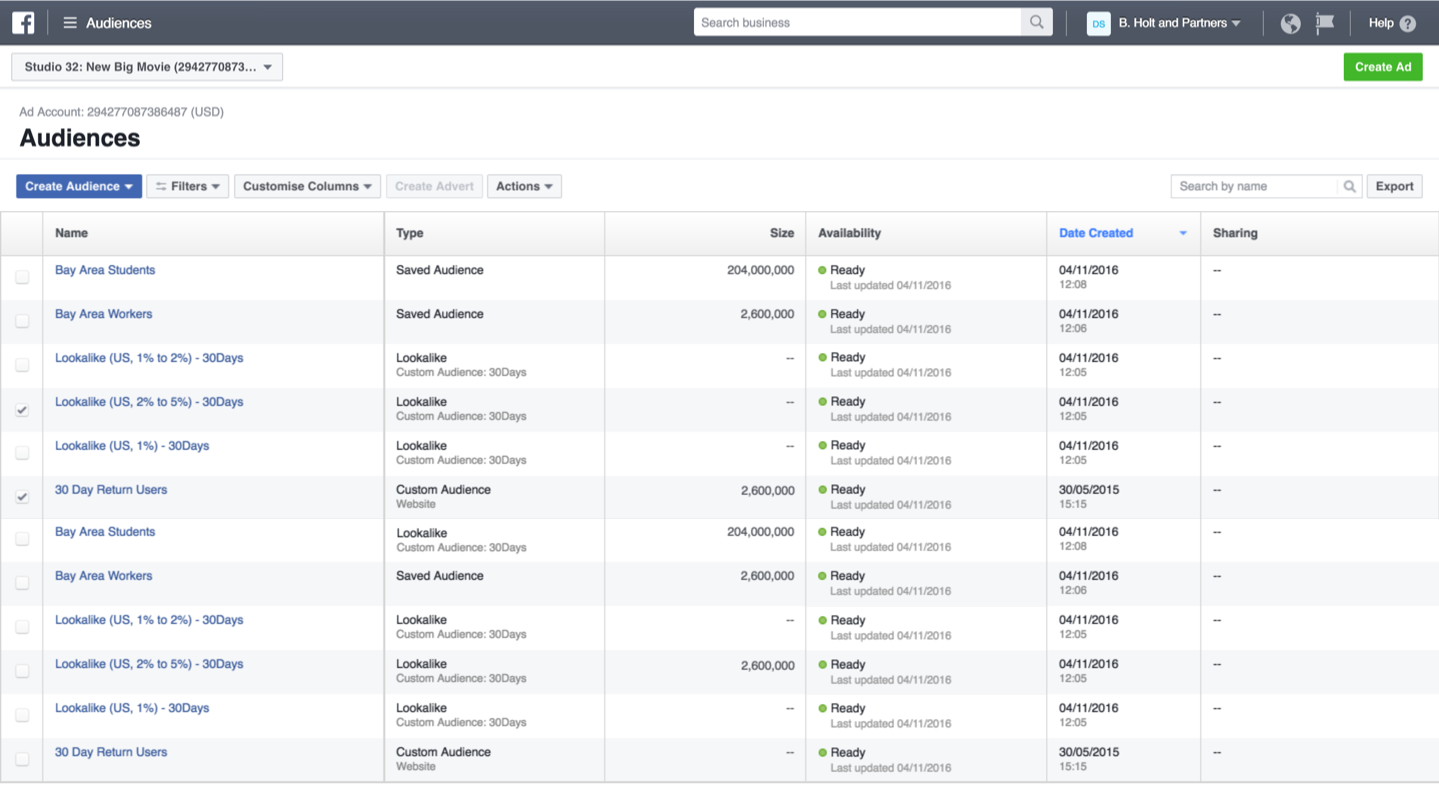
manage audiences on Facebook Business Manager

Who should create a Facebook Business Manager account?

If you’re running a small home business and managing your own social accounts, you don’t necessarily need a Facebook Business Manager account. But it’s a must if:

  • Your business has a team of people managing your marketing efforts and/or your social media presence.
  • You work with vendors who help you run or manage your ads and/or Facebook Page but don’t want to hand over all your assets.
  • You’re an agency that manages multiple Facebook or Instagram Pages and/or ad accounts for clients.
  • You need to control who has access and permission to your Facebook Page and don’t want to hand over ownership to employees or agencies who manage your business assets.

Get started with Facebook Business Manager

From what we’ve established so far, you have a clear idea of all the reasons why your business or agency should start using the Facebook Business Manager. Now let’s get to the most important part–how to use Facebook Business Manager.

1. Set up your Business Manager account

At this point, we’re assuming you already set up a Facebook business Page. If you haven’t, do that first. Otherwise, you need to create a Business Manager account.

For this, go to the Facebook Business Manager page and click on “Create Account.”
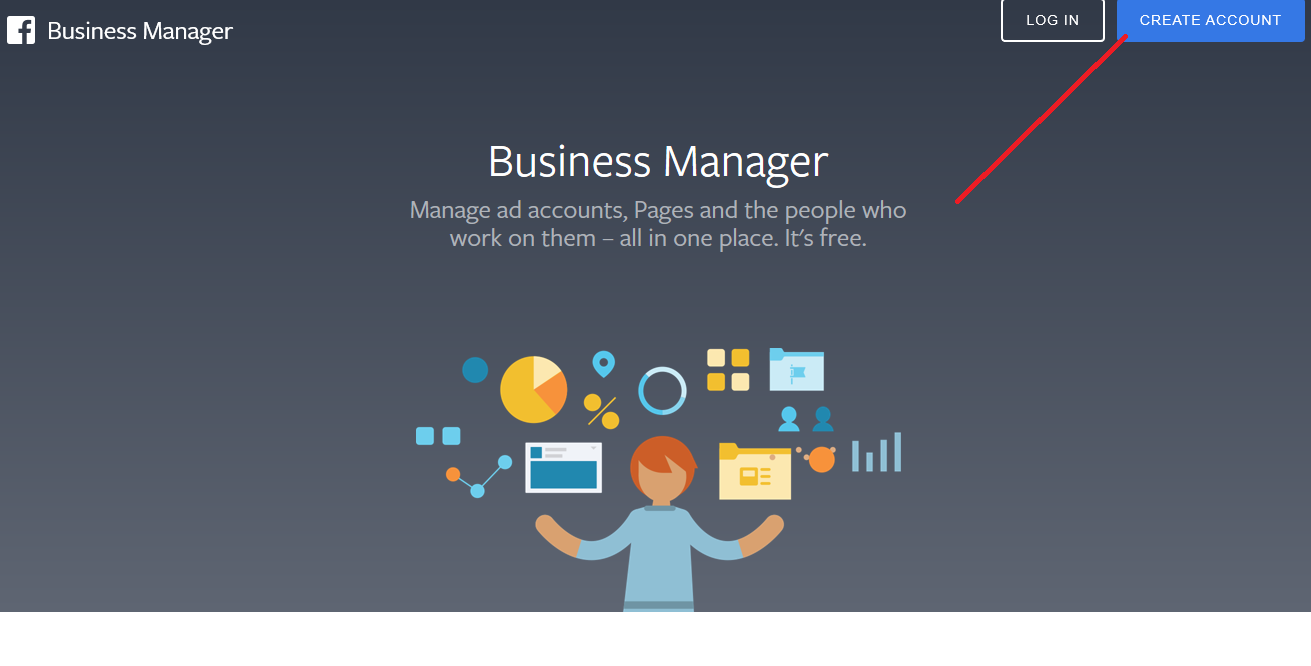
create account page for facebook business manager

Then fill out the form with basic information such as your business name, your name and your business email address. Then click on “Next.”
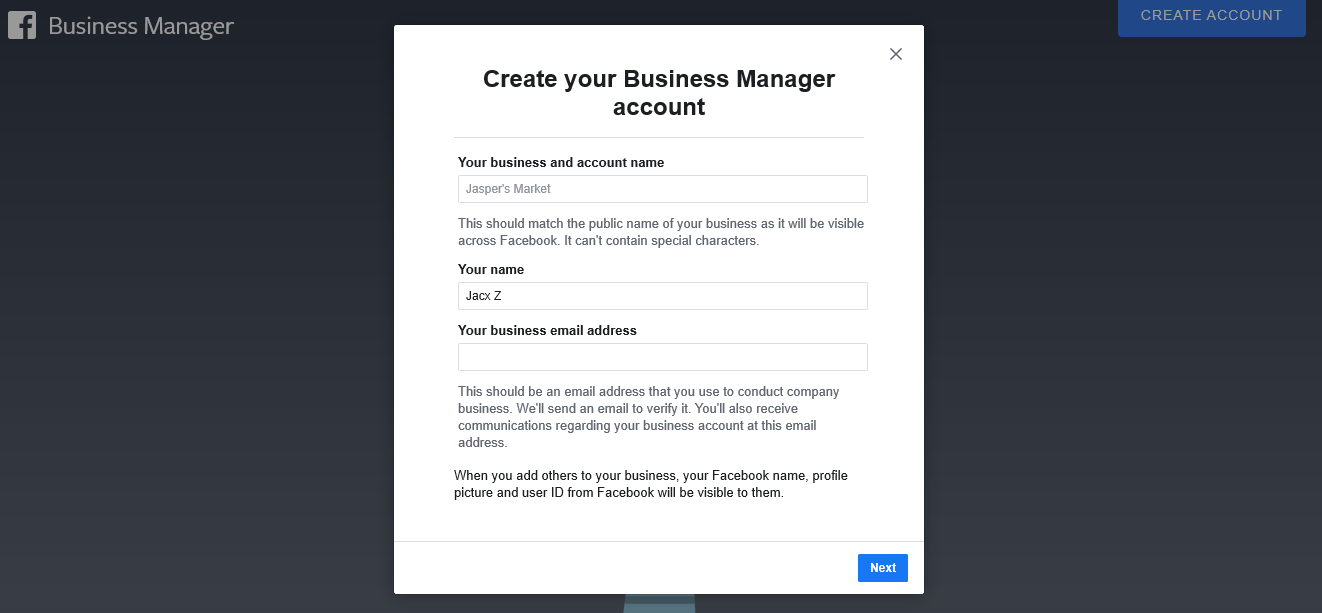
business manager account creation page 1

After this, you’ll need to enter more information about your business such as physical address, phone number and website. Once complete, click “Submit.”
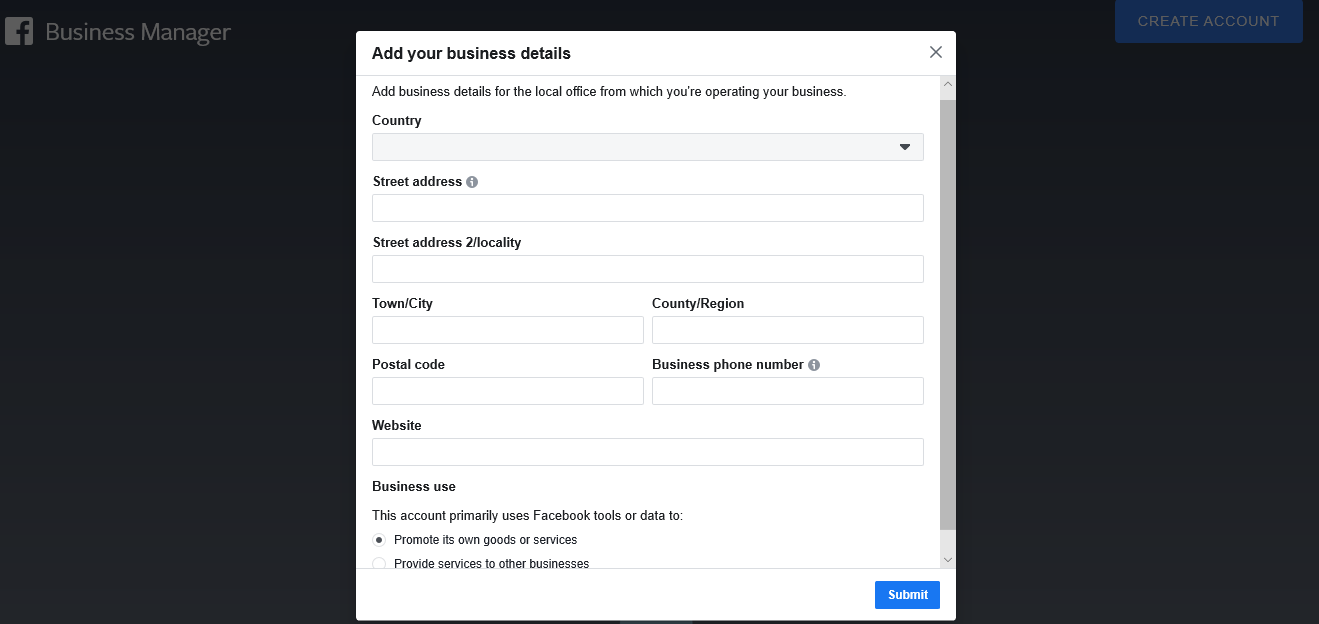
business manager account creation page 2

At this point you should receive a confirmation email. Click “Confirm Now” in that email, and that’s it; you now have a Facebook Business Manager account.

2. Link your Facebook Page(s)

Next, you link your Business Manager account with all the Facebook and Instagram Pages you’re managing. On your dashboard, you have the option to either “Add Page” or “Create Page.”
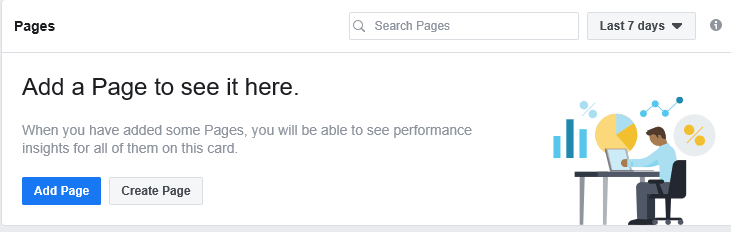
add page window on facebook business manager

To link an existing Page, click on “Add Page” and enter the Page name or URL. If you’re an admin of the Page, Facebook will automatically approve the link request.
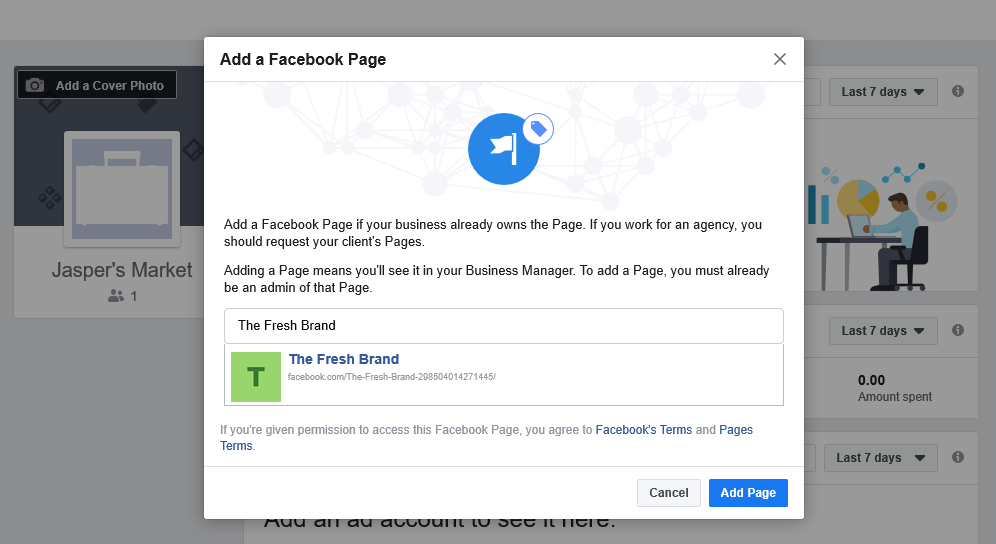
add page window on facebook business manager

For agencies that don’t own their clients’ business assets, linking a Page requires sending a request to your clients. In the Business Settings, find “Pages” under “Accounts,” and click on the “Add.” Then select “Request Access to a Page” and choose the Page you need access to.
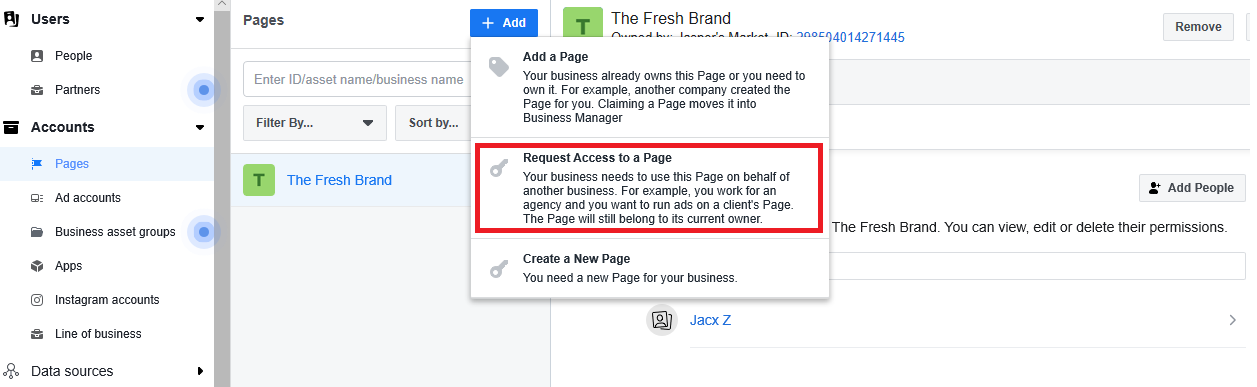
request access option for facebook business manager

Once you’ve linked the Pages you’re managing, you can keep track of all your posts and their respective performance metrics in one place. This includes metrics like Facebook reach and clicks/action so you know how well your efforts are paying off.
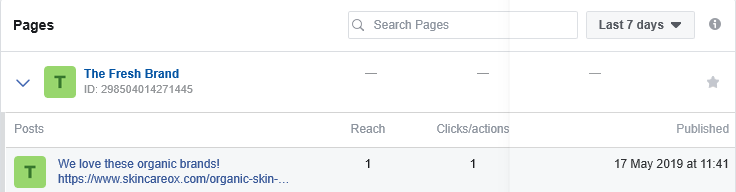
facebook business manager overview

3. Link your ad account

To run ads using Facebook Business Manager, you’ll also need to link the ad account you’re managing. Like with Pages, you can automatically link an ad account that you own and are an admin of. Click on “Add Ad Account” to link your existing ad account and then enter your account ID. If you don’t have one yet, you also have the option to create a new ad account.
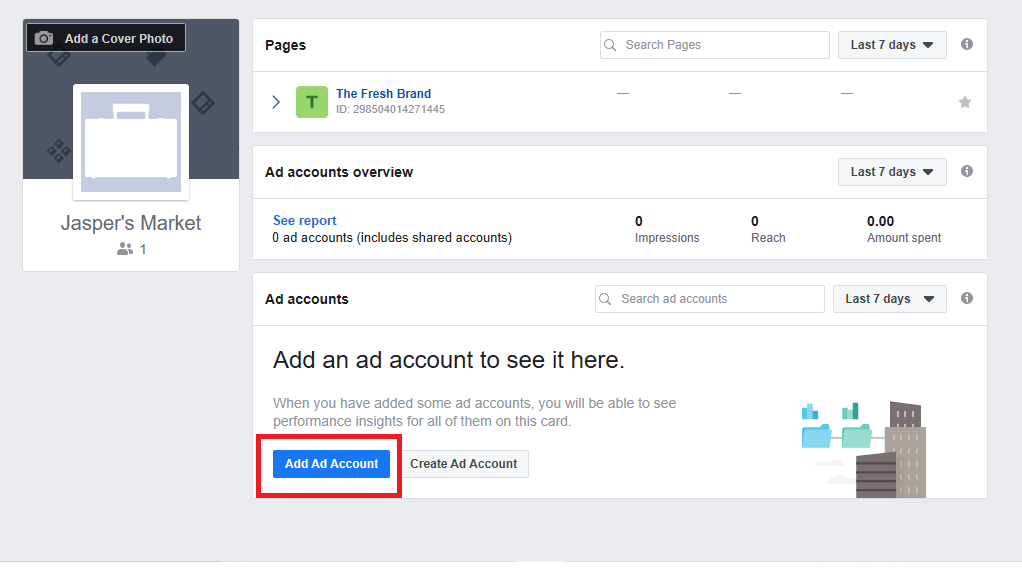
add account button on facebook business manager

Similar to requesting access to a Page, agencies would request access to a Facebook Ad account the same way. Under “Ad Accounts,” Click “Add” and “Request access to an ad account.” Enter the ID of the client’s ad account you need access to.
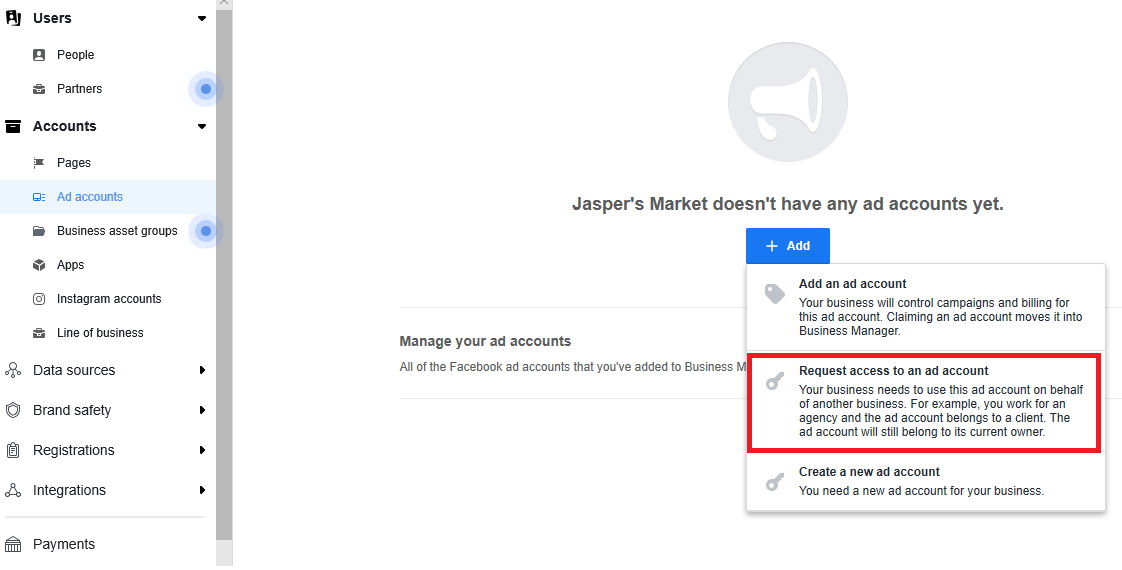
request access for ad account page

4. Add user to your Business Manager account

For businesses and agencies alike, one of the most crucial steps is to learn how to add people to your Business Manager account. In your Business Settings, under “People,” click “Add.”
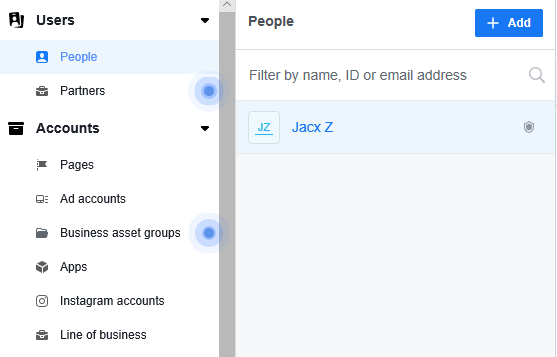
add people window facebook business manager

Enter the email addresses of the people you want to share access with. You’ll also have the option to assign them a business role–whether you want to give them admin access or limit them to employee access.
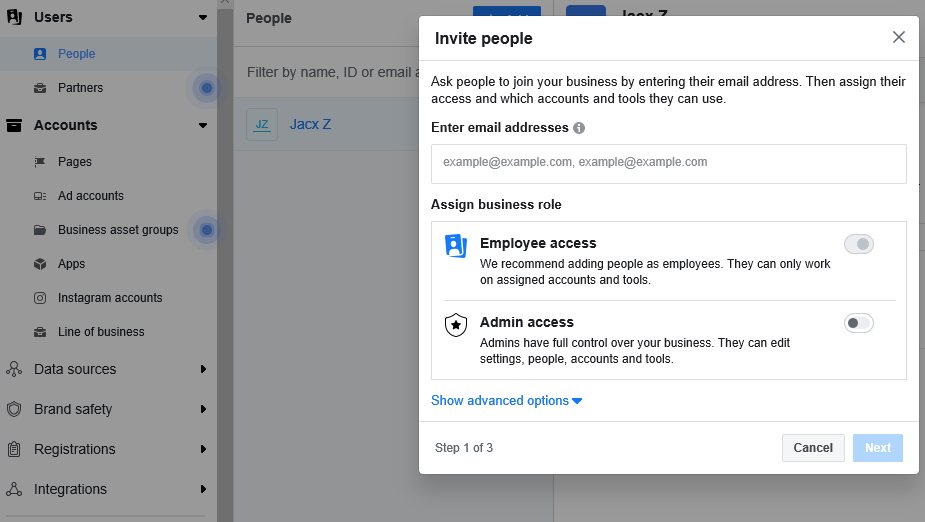
invite people window facebook business manager

When you give someone employee access, you get to choose which accounts and tools they have access to. So it’s perfect for agencies that have to delegate accounts, tasks and projects to different team members. That way, they can better manage their client accounts without putting their security at risk.

At Sprout, we often come across users who face problems with the Instagram “Page Owner” accounts. This is usually because these users don’t have admin access on the Facebook Business Manager account that owns the Page even though they have employee access. Note that although one Business Manager account retains ownership of the Page, multiple accounts can have access.

If you work with a vendor or agency, you’ll need to add them as a “Partner.” In your Business Settings, go to “Partners” and add a partner to share your business assets with.
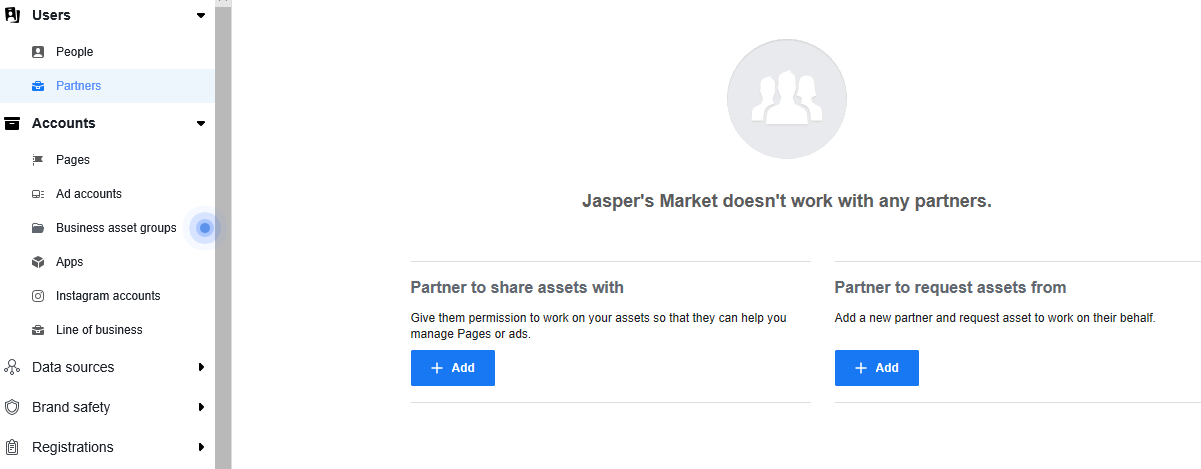
add a partner window facebook business manager

This will give them access to the account assets, although you still have ownership. So they can change the settings, add/remove people, add/remove accounts, decide who has access and to what level and so on. Similarly for agencies and vendors, they’ll need to request access from your clients from the same dashboard.

Make the most of the Facebook Business Manager

Once you’ve completed setup, you can use the Facebook Business Manager to keep track of all your Pages and ads or, in the case of agencies, your clients’ Pages and ads. Besides these basic tasks, here’s how you can make the most of Facebook Business Manager:

1. Boost your account security

Facebook Business Manager lets you add an extra layer of protection for your business assets, which is one of the top advantages. You have the option to set up two-factor authentication for your account in your Business Settings under “Security Center.”
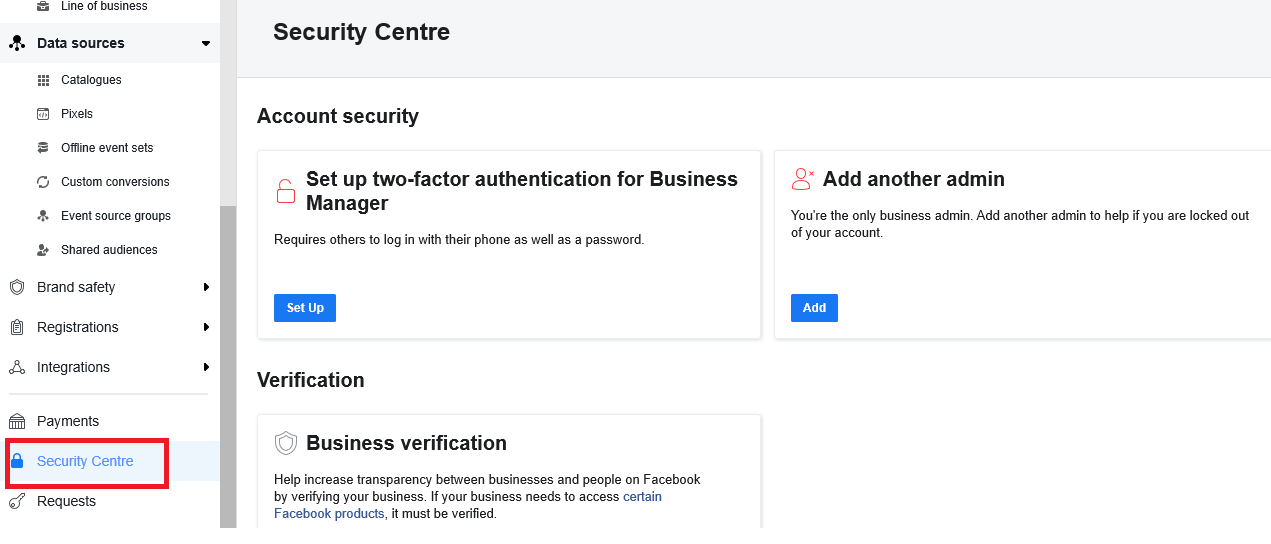
account security page facebook business manager

2. Set up Facebook Pixels

To effectively collect information that’ll feed your Facebook marketing strategy and ad campaigns, make sure you set up Facebook Pixels right away. In your Business Settings, go to “Data Sources” and find “Pixels.”
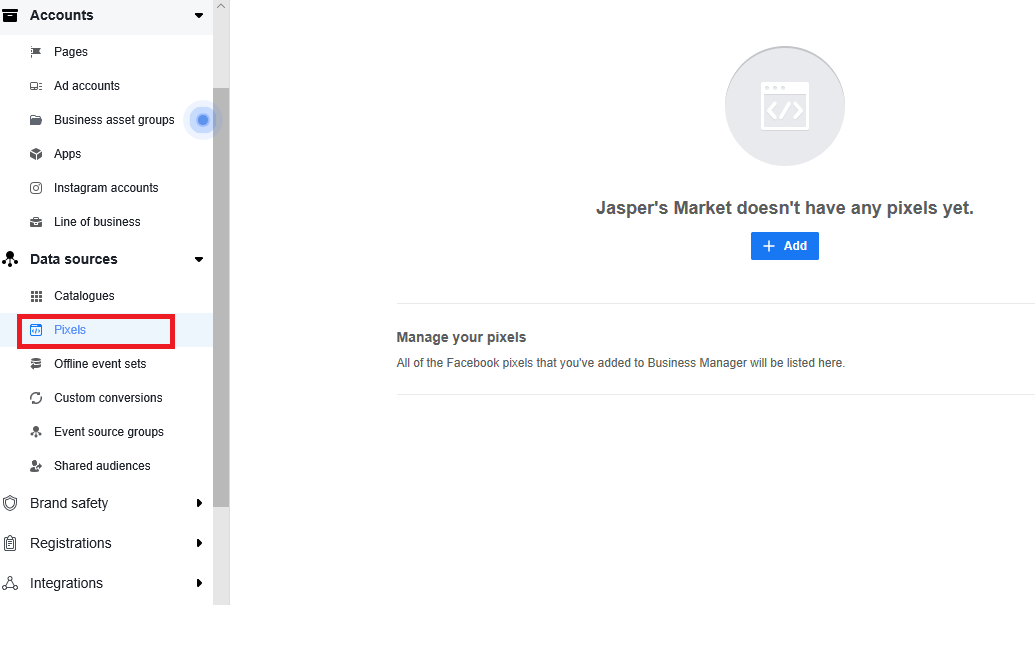
pixels window facebook business manager

You only need to name your Pixel here, but you also have the option to add your website URL to discover easy setup options. Select “Set up Pixel now” and follow the installation instructions in our Facebook ad targeting guide.

3. Set up Locations using Business Manager

If your business has multiple locations, setting up Locations will allow customers to find the most relevant store Pages through search engines. To do this, click on the “Business Manager” button at the top of the page and select “Shop locations” under “Assets.” The “Assets” section will also give you the option to add catalogs, audiences and branded media if you need to add those later.
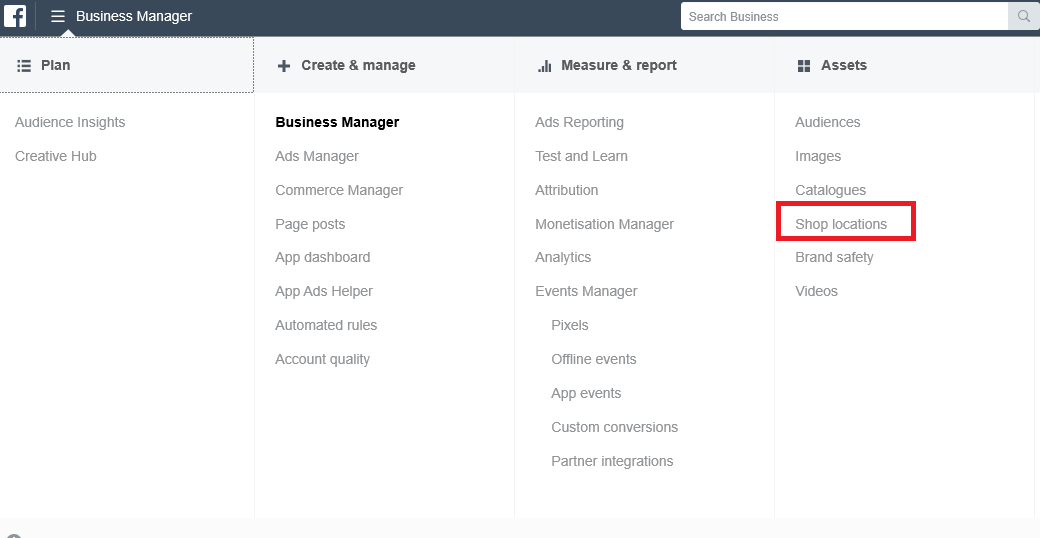
business manager dropdown menu

Click on “Add stores,” then select “Add manually” to fill out the necessary details about your store. Facebook also recommends using a spreadsheet if you need to add more than 10 shops.

Conclusion

Make the most of this guide to learn how to use the Facebook Business Manager–right from setting it up to adding other people to your account. And if you’re going to run ads from here, check out our detailed guide on setting up an effective Facebook advertising strategy.


This post A step-by-step guide on how to use Facebook Business Manager originally appeared on Sprout Social.


Source Sprout Social https://ift.tt/2R41YAE

How Profit-Mapping Helps You Avoid Using the Ways of the Past to Manage the Challenges of the Future

Is your organization trapped by history? Surprisingly, most companies are more shaped by their history than designed to respond to today's or tomorrow's opportunities and challenges. This problem influences virtually every aspect of a company's structure and its managers' behavior. Read the full article at MarketingProfs

Source MarketingProfs Daily: Marketing Strategy https://ift.tt/3dYsipY

Pro Tip: It’s time to evaluate your martech budget

During the coronavirus crisis, it’s important to make the hard decisions about what tools are essential and what are not.

Please visit Marketing Land for the full article.


Source Marketing Land - Internet Marketing News, Strategies & Tips https://ift.tt/2R78y9P

الأربعاء، 1 أبريل 2020

Five Google Ads Tips to Help You Become a Better PPC Marketer

Google Ads (the erstwhile AdWords) has become far more intuitive and easy to use than in years past. But despite a simplified interface, greater data transparency, and more features, it still has its share of nuances and complexities. These 5 tips will help you become a better PPC advertiser. Read the full article at MarketingProfs

Source MarketingProfs Daily: Search Engine Marketing https://ift.tt/2wKihvR

Five Google Ads Tips to Help You Become a Better PPC Marketer

Google Ads (the erstwhile AdWords) has become far more intuitive and easy to use than in years past. But despite a simplified interface, greater data transparency, and more features, it still has its share of nuances and complexities. These 5 tips will help you become a better PPC advertiser. Read the full article at MarketingProfs

Source MarketingProfs Daily: Search Engine Marketing https://ift.tt/2wKihvR

How to build a brand with celebrity social media management

Celebrities dominate social media.

Total understatement, right?

Heck, celebrity interactions represent some of the most engaged-with posts on social at large.

Couple that with the fact that nearly all of the most-followed Instagram accounts belong to celebrities (minus Nike, National Geographic and Instagram themselves).

katy perry instagram followers

That said, those millions of followers and interactions don’t happen by virtue of being “famous.”

And if you’re responsible for celebrity social media management, you know this all too well.

Much like traditional brands on social media, celebrity accounts are responsible for coming up with a content strategy that engages their target audience.

In this guide, we’ll break down the basics of celebrity social media management and how the big names out there score engagement.

How does celebrity social media management work?

Spoiler alert: not all celebrities are responsible for their own social accounts.

Well, at least not all the time.

Although some celebrity social media accounts might seem like random musings and updates, others are centered around specific promotions, shout-outs and announcements.

For example, it’s probably safe to say that this tweet from Harry Styles was actually written by Styles himself.

However, this promo was more than likely handled by a social media manager.

Celebrity social media management represents a sort of balancing act between marketers and their clients. Although celebrity accounts are almost always entertaining, there’s also the “business” aspect of anyone in show business.

New releases. Tours. Events. The list goes on and on.

Here’s some insight from Connie Chan, Manager of Social Strategy and Marketing at Warner Music Canada, on how the relationship between a social manager and an artist typically works:

“It really depends on the scenario of the post and how comfortable the artist is with social media.

We’ve dealt with a variety of artists who are super comfortable with taking charge of their own accounts and sharing all the content created by labels or themselves.

There are other artists who prefer the label to post only marketing assets on their behalf.”

In short, social media managers are often responsible for adopting their celebrity clients’ voice and working alongside that client to make sure their social presence is “on brand.”

And in the case where you can’t tell whether or not a celebrity runs their own Twitter or Instagram account, well, that’s kind of the point.

The importance of voice for celebrities on social media

Much like a distinct brand voice helps companies stand out from the crowd, the same can be said for the tone and personality of a celebrity on social media.

Chrissy Teigen might be the best example of someone with a distinct, consistent social brand.

Teigen’s off-the-cuff and often humorous tweets often don’t feel like they were written by a celebrity at all. Her human approach to social has made her all the more endearing and relatable to her millions of followers.

Meanwhile, someone like Mark Ruffalo adopts a more subtle tone while posting the sort of behind-the-scenes content we’d see from a celebrity account.

However, Ruffalo’s account also isn’t afraid to get political or highlight his activism. In a day and age where brands get real, celebrity accounts are expected to do the same.

And so celebrity social media management isn’t about who can be the funniest or post the craziest pictures. Just like brands have different goals and audiences, so do celebrities.

The role of a social manager for a celebrity is to determine what those goals are and how to reach them while communicating with thousands or millions of followers.

How do celebrities and their social managers come to a consensus about what to post, though? They talk about it.

Here’s more from insight from Chan on how marketers achieve a celebrity’s voice:

“To get the best results for managing several social accounts, our team plans a meeting with management and artists face to face to discuss the tone and how they prefer the accounts to be taken care of.

Some artists are very hands-on with day-to-day posts and content, whereas some prefer the social team to dive in and assist with copy and branding.

To make sure we get the best results and stay consistent with the artist’s voice, we send out copy for any social posts in advance to be approved by management.”

Celebrity social media content and best practices

Beyond voice, what types of content should celebrities and their social managers focus on?

Good question! There is no “right” answer, but below are some of the content types that keep followers engaged and on their toes.

News, updates and hype posts

Simply put, if someone followers a celebrity then they want to know what’s going on in their lives. This includes day-to-day updates and likewise big announcements.

For example, most celebrities will hype up their upcoming appearances to build anticipation and get more eyes or ears on whatever they’re doing.

Some celebrities work overtime to keep the hype train going. For example, Lady Gaga took to Twitter days, hours and even minutes before dropping “Stupid Love,” much to the joy of her fans.

Behind-the-scenes content

Another incentive for following a celebrity is the ability to go behind-the-scenes and get sneak peeks of their latest projects.

For example, this backstage photo from the Stranger Things set racked up a staggering 2+ million likes on Instagram.

View this post on Instagram

🤙📷 @tinarowden

A post shared by Finn Wolfhard (@finnwolfhardofficial) on

Meanwhile, behind-the-scenes posts can be used by themselves to build up a sense of hype. Here’s a great example from one of blink-182’s relatively recent recording sessions.

View this post on Instagram

blink-182 studio life.

A post shared by Mark Hoppus (@markhoppus) on

These types of posts only require a snapshot or quick video on behalf of a celebrity but they can be gold in terms of engagement and buzz.

“Slice of life” content

Perhaps one of the biggest appeals of following a celebrity on social media is to see what they’re “really” like.

Whether or not the reality that celebrities put out there is actually their real lives is a debate for another day. The point is that many celebrities use social media as a channel to post non-promotional content that makes them seem more relatable and human (think: Chrissy Teigen’s tweets).

Sophie Turner’s Instagram Stories are a great example of this, showcasing random moments and snapshots for fans.

Instagram Stories are key to celebrity social media management as you establish a personal connection with followers

Here’s another great example from Kumail Nanjiani, making light of his recent viral photoshoot with a humorous tweet.

Conventional wisdom might tell us that celebrity social media management is all about one-upping other celebrities and trying to flex on fans. The reality? It’s oftentimes the opposite.

“Celebrity” snapshots

Of course, some fans do live for the glitz and glamour of the so-called “good life.”

This is where skills like learning how to take a good Instagram photo and write awesome captions both come in handy.

View this post on Instagram

The dog walker.

A post shared by Cardi B (@iamcardib) on

Not every celebrity post can be iconic, but coupling a photo with a stylish filter and clever caption makes it much more likely to go viral.

Heartwarming and inspirational content

The common thread between much of a celebrity’s content strategy is showing off one’s personality and human side.

Whether through philanthropy, charity or heartwarming moments with fans, celebrities can show that they’re about more than just money and fame.

This begs the question, though: which pieces of content are best for celebrities? Is it those random, off-the-cuff tweets? Photos on the red carpet?

The best way to figure it out is by digging through your analytics. Much like a traditional brand, Chan notes that celebrity accounts take full advantage of social media reporting and tools such as Sprout Social to spot their top-performing posts.

“We use the weekly and monthly reporting tools on Sprout to auto-send to all those involved with the artist accounts. It’s a great way to track how the profiles are doing and what type of copy or caption does best.”

reporting and performance analytics are key to celebrity social media management


How celebrities on social media interact with fans

The beauty of social media for celebrities is that it provides a platform for stars to interact with fans directly.

Celebrity social media management means shouting out fans and followers in addition to publishing your own content

Beyond likes and retweets, celebrities can drive engagement and interact with fans simply by asking questions.

Visiting a new town while on tour? Ask about the local cuisine. Looking for something new to watch or read? Again, ask fans!

Celebrities and their managers can keep an eye on mentions and DMs to figure out who to like and shout-out.

And remember:  while something as simple as a “Like” or retweet only takes a moment for a celeb, but could very well mean the world to a fan.

celebrity social media retweet

What are the go-to social media platforms for celebrities right now?

Good question! Platforms like Twitter and Instagram still remain the go-to communities for celebrities.

Twitter’s more or less been established as the hub for celebrity accounts since its inception. The fact that the platform pretty much thrives on trending topics and quick engagement make it perfect for celebs on-the-go or juggling huge followings.

Meanwhile, Instagram is prime for snapshots and photos. Combined with Instagram Stories, it’s the ultimate platform for giving fans a glimpse into your day-to-day life.

But also note that TikTok is emerging as a channel for celebrities.

celebrities on tiktok

Since the platform is still relatively young, celebs are still getting the hang of it. Acting sort of as a spiritual successor to Vine, it’s definitely worth checking out for stars whose audiences are part of the younger crowd. Either way, it’ll be fascinating to see how celebrities continue to adapt to the platform.


And with that, we wrap up our guide!

Do you have what it takes to build a celebrity brand?

Celebrity accounts are a staple of social media.

In fact, you’d be hard-pressed to find someone who doesn’t follow their favorite actors and musicians via social.

That said, celebrity-level engagement doesn’t happen automatically. It doesn’t happen by accident, either.

Celebrity social media management is a tough gig. Not only are managers responsible for entertaining a massive audience, but also keeping in mind their clients’ tone as they create and promote fresh content.

Looking to build a celebrity brand? Curious about what it takes to be considered “legit” in the social space? Make sure to check out our guides on how to get verified on Instagram and Twitter!


This post How to build a brand with celebrity social media management originally appeared on Sprout Social.


Source Sprout Social https://ift.tt/2qJevyM

How local businesses should be communicating with customers during COVID-19

Hear how local search veterans are using every channel available to help their clients stay relevant and keep customers informed.

Please visit Marketing Land for the full article.


Source Marketing Land - Internet Marketing News, Strategies & Tips https://ift.tt/3aBa8Zc

Google adds ‘public health emergency’ to inappropriate content ads policy

The change to the sensitive events section of the policy is effective immediately.

Please visit Marketing Land for the full article.


Source Marketing Land - Internet Marketing News, Strategies & Tips https://ift.tt/3dOcrKe

Announcing Discover MarTech: A Virtual Event For Strategies & Solutions

Continue your learning initiatives, engage with solution providers, and connect with the MarTech community — all from the comfort and safety of your very own desk.

Please visit Marketing Land for the full article.


Source Marketing Land - Internet Marketing News, Strategies & Tips https://ift.tt/2xHBpug

How to Connect With Consumers on LinkedIn: 5 B2C Examples

Does your business sell consumer goods? Looking for alternative ways to reach your B2C customers? In this article, you’ll discover how businesses in five B2C industries are using LinkedIn to connect with individual prospects and consumers. The Case for B2C Outreach on LinkedIn Although LinkedIn has traditionally been known as a B2B network, the platform […]

The post How to Connect With Consumers on LinkedIn: 5 B2C Examples appeared first on Social Media Marketing | Social Media Examiner.


Source Social Media Marketing | Social Media Examiner https://ift.tt/3dLEuKw